CLASH OF CLANS AUTOMATION

Your Village.
On Autopilot.

Less repetition. More control. Bring your Home Village sessions together with ClashPilot Pro for Windows.

Built for Windows
THE COMMAND CENTER
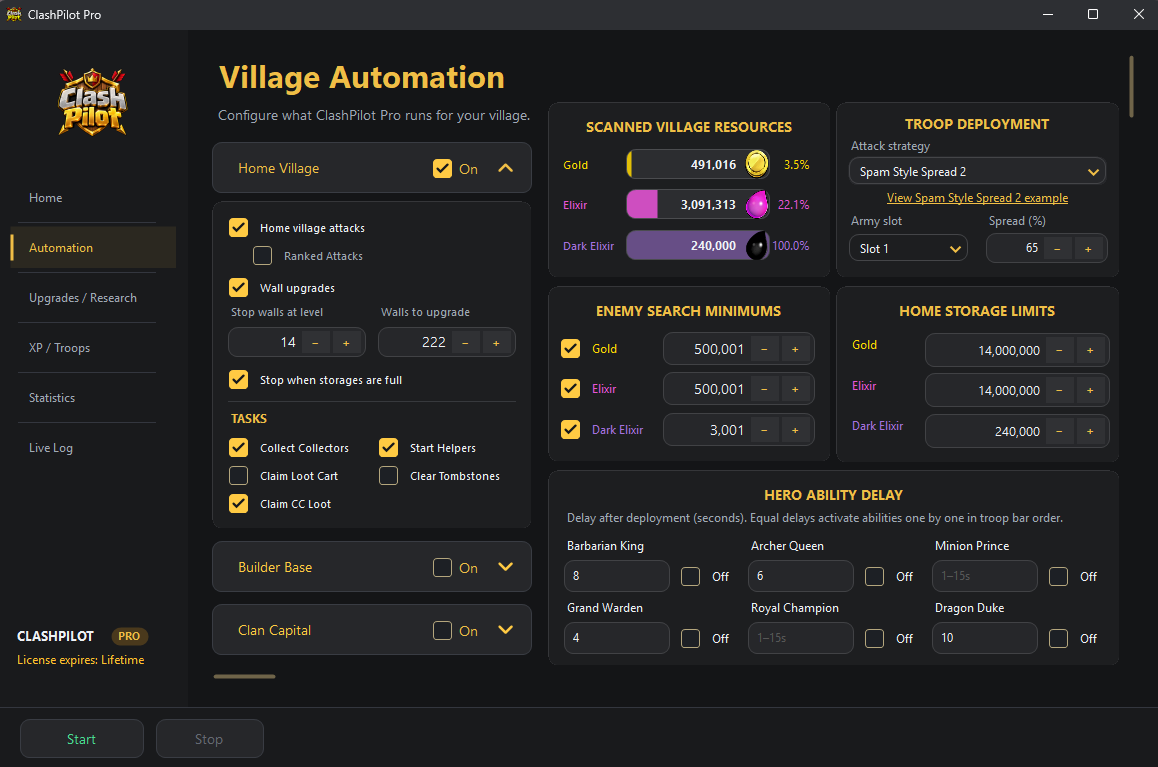
ClashPilot Pro Village Automation screen with resource scanning, enemy search minimums, storage limits, and troop deployment settings
One place. Your entire session.

THE CLASHPILOT COMMUNITY

Join our Discord.

Get help, see updates, ask questions, and connect with other ClashPilot users.

Join our Discord.
WORKS WITH YOUR EMULATOR
MMuMu PlayerLDLDPlayerBBlueStacks

BUILT AROUND YOUR VILLAGE

A little less clicking.
A lot more control.

From connecting your emulator to reviewing a session, keep the essentials within reach.

01

Connect. Detect. Go.

Find running emulator instances automatically. Select your instance without hunting for installation paths.

AUTOMATIC INSTANCE DETECTION
02

Your session. Your rules.

Configure Home Village tasks, upgrade your heros, pets, buildings, defenses, troops and more.

CUSTOMIZABLE JOB SETTINGS
03

Your village. Without the grind.

Automate attacks, collect resources, and keep upgrades moving with settings you control.

LESS GRIND. MORE PROGRESS.


READY WHEN YOU ARE

From desktop
to village.

Your first session starts with a few simple steps.

Get the Windows app
  1. 01

    Launch your emulator

    Open MuMu Player, LDPlayer, or BlueStacks and start the Android instance you want to use.

  2. 02

    Find your village

    Open ClashPilot, choose your emulator, and click Detect. Select your running instance.

  3. 03

    Activate and take control

    Enter your activation key, configure your Home Village settings, and start your session.

BEFORE YOU START

A few good questions.

What do I need to run ClashPilot?

A Windows PC, a supported Android emulator with Clash of Clans installed, and a ClashPilot activation key. Supported emulators are MuMu Player, LDPlayer, and BlueStacks.

How do activation keys work?

Activation keys are issued through our website checkout or our discord ticket services. A key binds to the first PC that activates it. Timed keys start their duration on first activation.

Which village does ClashPilot support?

ClashPilot Pro currently focuses on the Home Village. Join our discord to be notified when we release the Builder Base & Capital!

Is every automation feature ready?

The project is in active development. We are always updating ClashPilot!

MEET YOUR NEW COPILOT

Your Village.
Your next move.

Get ClashPilot Pro and make yourself at home.

Download for WindowsLatest · ZIP downloadPurchase

CLASHPILOT PRO

Get your activation key.

Activate ClashPilot on your Windows PC and put your village settings to work.

1 Day

$5 USD

1 Day access · One-time payment

Purchase

7 Days

$7.50 USD

7 Days access · One-time payment

Purchase

30 Days

$10 USD

30 Days access · One-time payment

Purchase

Lifetime

$30 USD

Lifetime access · One-time payment

Purchase

Payments are handled securely on Stripe.